6. Import/export references in .ris or .BibTeX format
Section outline
-
Goals
- Retrieve references in .ris or .BibTeX format
- Import references in .ris or .BibTeX format
- Retrieve references in .nbib format
- Import references in .nbib format
- Create a reference file in .ris or .BibTeX format
-
Importing and exporting bibliographic references in RIS or BibTeX format
These two formats should be considered as interchange formats, meaning they are standard formats for exchanging bibliographic references.
This method can be very useful for collecting a batch of bibliographic references either from a resource or from another reference management software (for example, when switching from EndNote to Zotero, from Mendeley to Zotero, etc.).
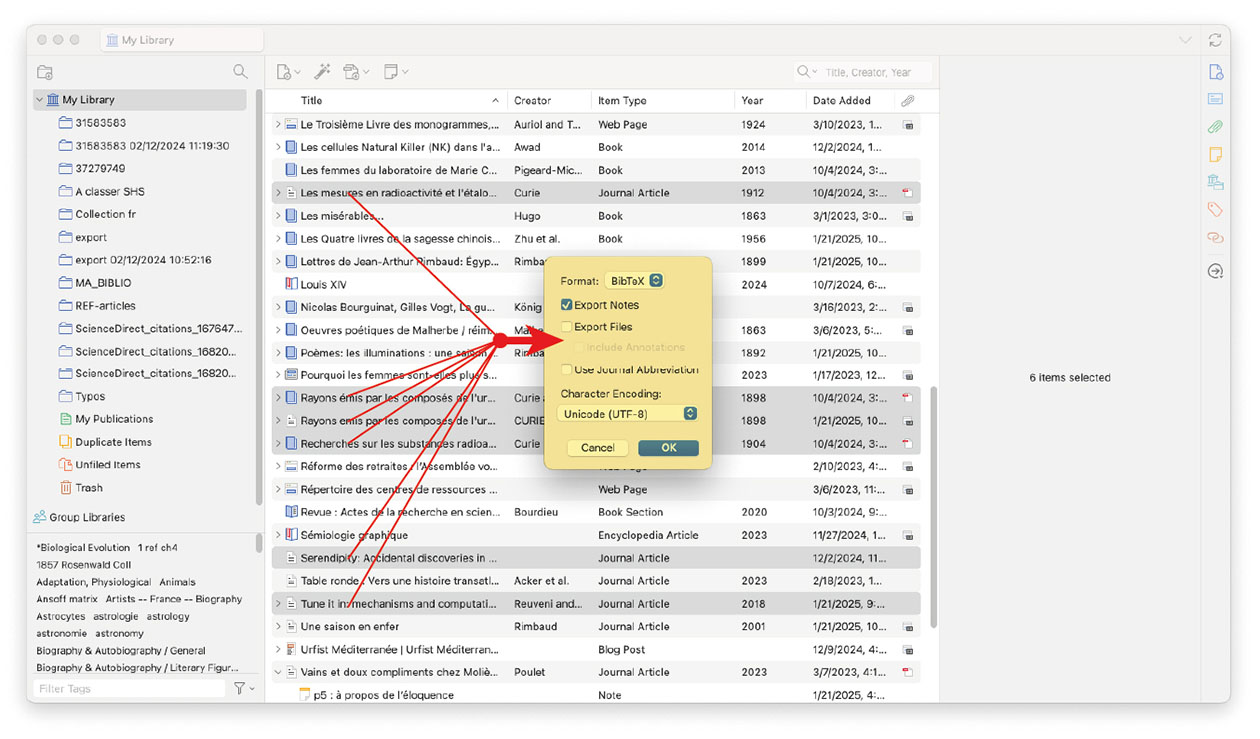
Just as you can import a RIS or BibTeX file, you can also export references from your library in RIS or BibTeX format.
Select references in the central column, right-click on the selected references and choose "Export Items" from the menu (in Zotero, references are referred to as items). Choose the desired format, then click "OK". Finally, enter the desired name for the exported file (containing the references).