Section outline

  • Goals

    • Describe the Zotero interface
    • Understand the layout and menus of the Zotero interface
    • Callisto. [Vidéo]. Canal-U. 2 - The Zotero interface
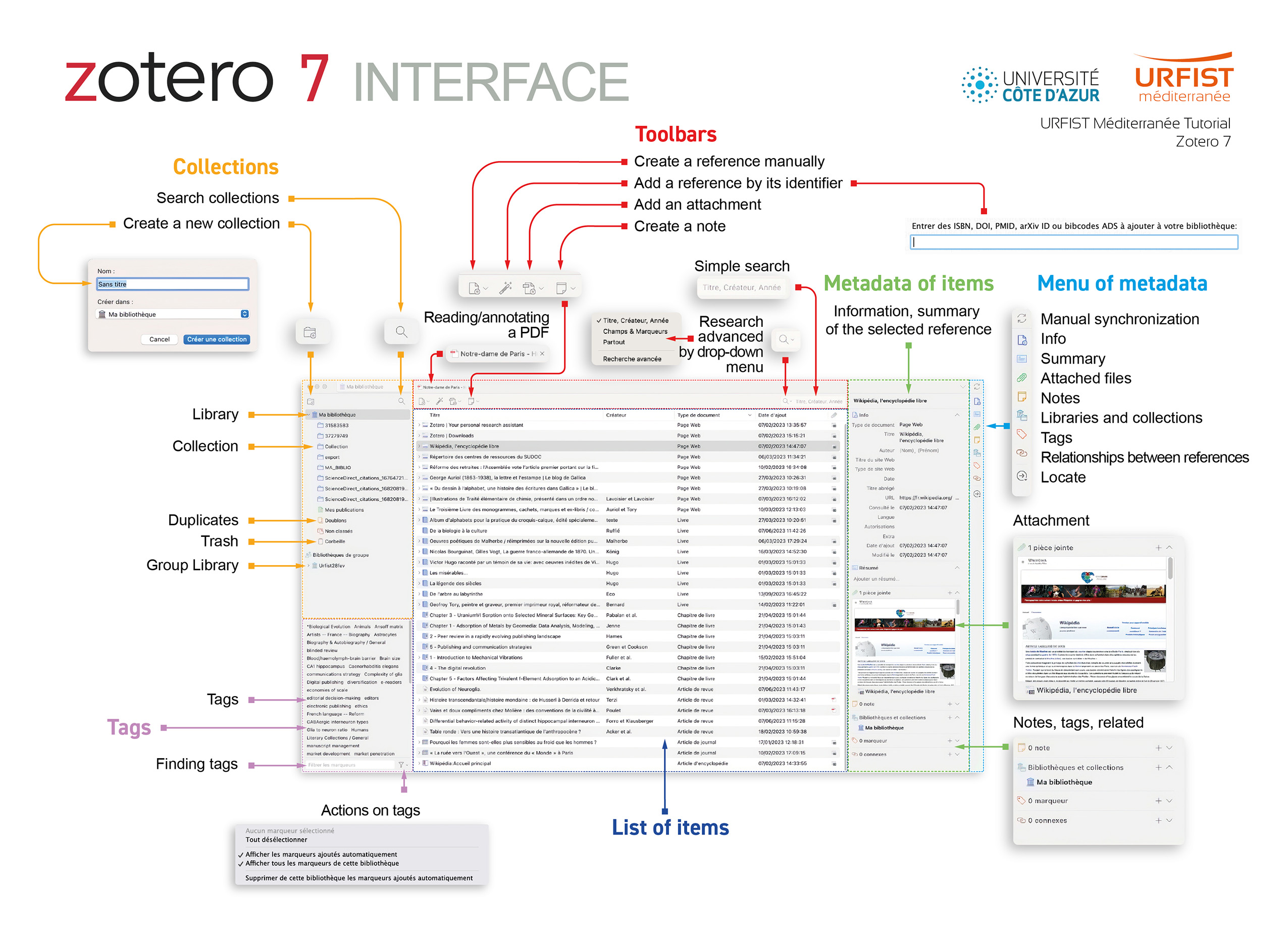
    • The 6 areas of the interface

      1. Collections

      The left column displays the main collection (the “My Library” folder) which will contain all the bibliographic references you collect. Currently, only the “My Library” collection is created by default, but you can create other collections.

      2. Toolbars

      To manage your references, the menu displays the tools.

      3. List of items

      The center column displays (once you have collected references) the list of references contained in the library or collection you select.

      4. Metadata of items

      The right-hand column will display the bibliographic record for the reference selected in the center column. It shows all the elements that make up a bibliographic reference in the form of fields (title, author, journal, volume, pagination, etc.).

      5. Menu of metadata

      Menu of metadata allows you to manage the bibliographic record and consequently the bibliographic reference: information, attachment, note, marker, link.

      6. Tags

      This layout allows you to manage the tags associated with bibliographic references.

    • The Zotero interface

      Details of the Zotero 7 interface.

      Open image in a new tab